
How to Separate Stems in Logic Pro on an Intel Mac
We uncover why Logic Pro Stem Separation Doesn’t Work on Intel Macs, and the Best Alternatives Available Today
We’ve previously written a comprehensive guide on how to separate stems in your DAW, which applies to all DAWs, including Apple’s Logic Pro software. In this article, we’ll pay particular attention to Logic Pro, whether its native stem separation works on Intel Macs, and what other options are available to Intel Mac users.
Does Logic Pro’s Stem Separation Work on an Intel Mac?

The short answer is no, Logic Pro’s stem separation is not supported on Intel Macs. Stem separation requires an enormous amount of processing power to split mixed audio into stems.
While all stem separation tools have to strike a balance between processing speed and audio quality, Intel-based Macs just don’t have the processing power required to cleanly separate stems within a reasonable timeframe.
How to Find Out if Your Mac Supports Logic Pro Stem Separation

To find out whether your Mac supports Logic Pro’s native stem separation, click on the Apple logo at the top left of your screen, then click ‘About This Mac’.
If the ‘Chip’ field mentions an M1, M2, M3, M4, or M5 Silicon chip, then Logic Pro’s native stem separation will work on your device. If it mentions an Intel chip, then unfortunately, it is not supported.
Why is Stem Separation Greyed Out in Logic Pro?

There are a few potential reasons why stem separation might be greyed out in Logic Pro.
Device Compatibility: Your Mac uses an Intel chip, and therefore does not support Logic Pro’s native stem separation (please see above).
Using a Translation Tool like Rosetta: You are running Logic Pro with Rosetta. To fix this, close Logic Pro, right-click on the application icon, select ‘Get Info’ then uncheck the ‘Open using Rosetta’ box.
User Error: You have not selected an individual audio clip. Logic Pro’s stem separation only works on single audio channels, and not on MIDI channels or multiple audio channels.
How to Separate Stems in Logic Pro on an Intel Mac
While Logic Pro’s native stem separation isn’t available for Intel Mac users, there are some other ways to split stems, including an option you can use right inside Logic Pro, without leaving the DAW.
1. Use PEEL STEMS 2 to Separate Stems in Logic Pro in Real-Time

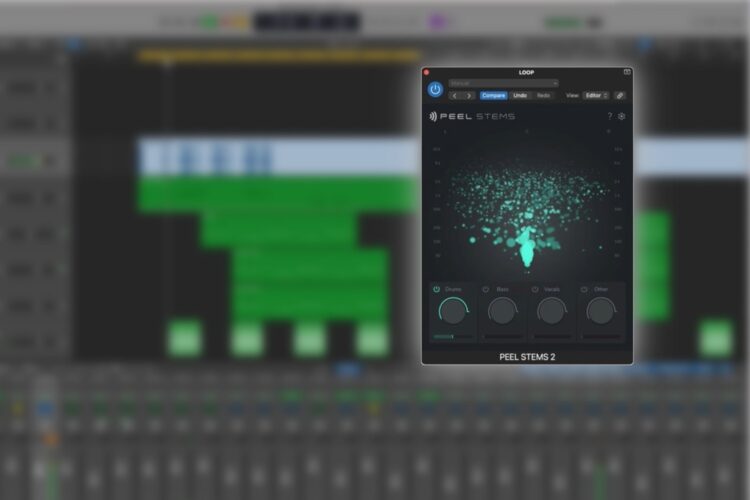
There are a growing number of stem separation plugins out there today, but only a few of them work in real-time. PEEL STEMS 2 is one such plugin, and there’s good news if you’re an Intel Mac user, because the plugin is compatible on both Silicon and Intel Macs, as well as Windows devices.
PEEL STEMS 2 comes as an AU, VST3 or AAX-format VST plugin, and unlike most stem separation solutions, it works in real-time, right inside your favourite DAW. Simply place PEEL STEMS 2 on an audio channel as an insert to immediately separate any song into four stems: Drums, Bass, Vocals, and Other.
Aside from the obvious compatibility advantages, PEEL STEMS 2 offers a number of workflow and security advantages over other stem splitting tools:
- Uninterrupted Creative Workflow: Instantly separate stems, right in your DAW
- Separate Stems with Precision: Use the Isolation control to refine your processing
- Ultimate Audio Precision: Use the built-in spectral processing to focus on specific frequencies and stereo ranges
- Split Stems Locally and Securely: No uploading your intellectual property to servers for cloud-based processing
- One-time Purchase: No subscriptions, just unlimited stem separation
Download the PEEL STEMS 2 demo now to try out the real-time stem separation workflow.
2. Use a Web-based Stem Separation Platform

Some of the most common stem separation tools are web-based and accessed via your browser. While this does make stem separation accessible on any device, it introduces some disadvantages.
The main drawback with web-based stem separation platforms is how they can impact your creative flow. Any distraction or detour can massively hamper your progress, and leaving your DAW to upload a file, wait for it to process, and then download the separated stems can be a time-consuming activity.
Additionally, there is growing concern around the security of cloud-based stem separation solutions. Many users, especially industry professionals, are opting for local stem separation tools. This means they can avoid uploading their intellectual property to the cloud.
3. Use Another DAW with Intel-supported Stem Separation

While Logic Pro’s native stem separation doesn’t work on Intel Macs, if you have access to another DAW, this might be a workable solution for you. Most major DAWs now come with built-in stem separation, and while the processing speed will depend on your device specification, most DAWs’ stem separation is supported by Intel Macs as well as the newer Silicon Mac architecture.
Audio technology is advancing faster and faster each day, and it can be hard to keep up with the latest products, their features, and compatibility. With that in mind, we recommend that you check that your system meets the requirements for any products you plan to use.
FAQs
What are Stems in Audio?
Stems refer to audio files that contain processed instruments that are grouped by category. Examples of stems might include drums, vocals, bass, FX, or melodic parts.
Does Logic Pro’s Stem Separation Work on an Intel Mac?
No, Logic Pro’s stem separation is not supported on Intel Macs. Instead, you can use a real-time stem separation plugin like zplane PEEL STEMS 2, which works on any VST3, AU, or AAX compatible DAW.