
5 Unique Vocal Production Techniques Using TIMBRE
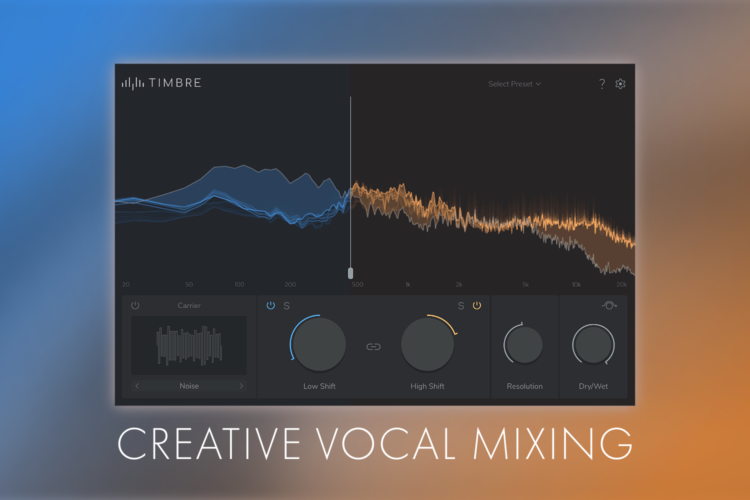
Discover five creative ways to transform, enhance and mix vocals using TIMBRE’s dual-band timbre-shifting and vocoding capabilities.
From subtle tonal adjustments to dramatic vocal transformations, formant shifting can be a powerful tool for shaping vocals in a mix. Unlike conventional pitch shifting or EQ, it allows you to alter the perceived tone and character of a voice without changing the notes being sung.
With its dual-band timbre-shifting engine, TIMBRE takes this concept further by allowing different areas of the frequency spectrum to be processed independently. This opens up new possibilities for both creative vocal processing and practical mixing tasks, whether you want to transform the character of a vocal, tame harsh frequencies, add presence or create space between competing elements.

In this guide, we’ll explore five vocal production techniques you can try with TIMBRE in your own projects. Want to follow along yourself? Head to the TIMBRE product page to download the free demo now.
1. Transform the Vibe and Tone of Vocals
One of TIMBRE’s primary use cases is also one of the easiest to apply to your own vocals. By default, TIMBRE’s Low and High bands are linked, so when you adjust one band’s Shift control, the other band is adjusted too. This essentially means TIMBRE is operating as a traditional single-band formant-shifter across the entire frequency spectrum.

Place TIMBRE on a vocal channel and adjust the Shift amount to hear how TIMBRE affects the tone and character of the signal, without affecting its pitch. Turn the Shift down for a deeper, darker tone, or turn the Shift up for a lighter, brighter tone.
As well as the Shift parameters, you can also refine the sound of the processing with the Resolution dial. At a value of 0, the timbre-shifting tends to sound more crunchy and digital. At a value of 100, it generally sounds smoother and more natural. Experiment with different combinations of Shift, Resolution and even Dry/Wet values to discover new ways to transform the sonic qualities of vocal recordings.
2. Tame Vocal Sibilance
One common problem that recording musicians face, is that vocal takes can be too sibilant, causing an unpleasant listening experience. This refers to the piercing ‘s’, ‘sh’, ‘ch’ and ‘t’ sounds that can occupy the 5kHz to 10kHz frequency range when speaking or singing. In an ideal world, sibilance would be minimized at the point of recording by moving the microphone further away, or changing its orientation.
In the real world, this isn’t always possible. Perhaps you’re working with pre-recorded vocal takes or samples, or maybe you want to achieve a really close and present sound. Either way, it’s absolutely possible to tame sibilance after the fact, and TIMBRE makes this process particularly easy.
In this example, our vocal recording has a very distracting harshness and sibilance. By holding Shift and placing our cursor over the bunch of peaks, TIMBRE’s visualizer shows a lot of frequency information around 7.5kHz.

To tame this, we’ve dragged the Split Frequency slider to around 6.5kHz, unlinked the High and Low Shift controls, then reduced the High Shift amount to around -8.0. This attenuates those unwanted frequencies without affecting the pitch of the vocal recording or anything below 6.5kHz

3. Increase Vocal Presence and Clarity
As discussed above, sibilance is one issue that you might run into when there is too much information in the 5kHz to 10kHz range. If there’s not enough information in that range, though, you might face the opposite problem, meaning your vocals can lack clarity or sound dull or flat.

TIMBRE makes it much easier to get this balance right. In this case, we’ve applied a much more subtle formant shift of +2 semitones, but across a broader frequency range of 2kHz and above. This gives us a much more natural end result that sounds more present and clear than the unprocessed vocal, without introducing unwanted sibilance.
4. Carve Space Between Your Lead Vocal and Melody

We can combine the concepts from the techniques above to mix a vocal and another melodic element with ease. This is particularly useful when a lead vocal and a key melodic element, such as a piano, are both occupying the same frequency range.
By reducing the formant of the melodic element and increasing the formant of the lead vocal, this pushes the melodic element back in the mix while bringing the vocal forward. It also carves space for the lead vocal, giving it more clarity and presence.
Once again, subtle tweaks to the formant of each element are sufficient to achieve this affect. We’ve applied approximately +3 semitones for the vocal and -2 semitones to the piano.
5. Introduce a New Rhythm to Vocal Takes or Pads
The final vocal production technique we’ll cover today uses TIMBRE’s in-built Sidechain Carrier mode to impart the rhythm of an audio signal into a vocal recording. This works particularly well on legato vocal recordings or even vocal pad samples, but we encourage you to try the technique on a range of material.
Once you’ve got your vocal and rhythmic elements on two separate audio channels, insert an instance of TIMBRE on the rhythmic element. Engage the Carrier section at the bottom left of the plugin, then use the left or right arrow to select the Sidechain Carrier Mode.

Now set the vocal channel as TIMBRE’s sidechain signal to route the vocal audio into TIMBRE. Instructions on how to do this for each DAW are in the product manual. You should now hear that the tonal qualities of the vocal are being combined with the pattern and contour of your rhythmic element.
As always, try a range of plugin presets and configurations to discover new sonic territories. Experimenting with the level of the unprocessed vocal channel and the Dry/Wet control of TIMBRE allows you to blend the effected signal in to your taste, and you can take the effect even further with additional processing.
Want to Try These Vocal Production Techniques for Yourself?
Until Wednesday, 30th September, TIMBRE is available with an introductory discount of 33%. You can also download the free demo to see how TIMBRE fits into your vocal production workflow.